The picks
The best hygrometers, ranked on published accuracy
Almost every piece of advice on this site ends in the same instruction: take a reading. This is the instrument that does it, and the specification that decides whether its number is worth acting on is the one most of the category declines to print.
By Sawyer V. · Published
The short answer
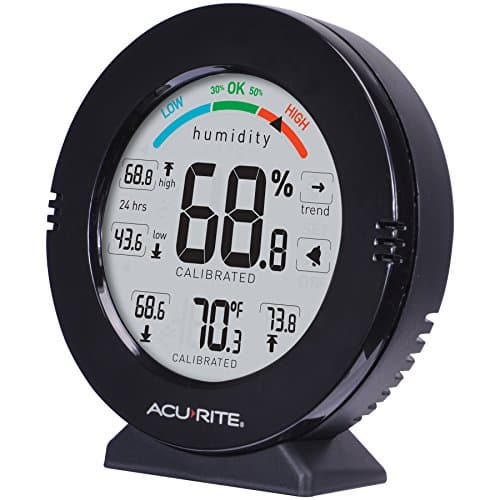
Buy the AcuRite 01080M if you want a screen on the wall — ±2% RH from 10 to 90%, a manual calibration option and 24-hour and all-time high/low records, for the least money here. If you want the most trustworthy number, the SensorPush HTP.xw publishes ±1.5% typical and ±3% maximum — the tightest figure in this group — but it has no display at all and is read on a phone.
Fan & Frost earns a commission when you buy through our links, at no cost to you. It never changes a ranking, and we say so when the right answer is the cheaper unit or nothing at all. Full disclosure · How we pick.
At a glance
The picks, ranked
Tap any row to jump to the full reasoning. Prices are live from Amazon where we have them, and read “check price” where we don’t — never a number we cannot verify today.
| # | Product | Best for | Price |
|---|---|---|---|
| 1 | Best overall AcuRite 01080M Pro Accuracy Temperature and Humidity Gauge ±2% RH from 10 to 90%, ±0.5 F, a manual calibration option and 24-hour plus all-time high/low records. The only pick that is both cheap and candid about where its accuracy applies. | Anyone who wants to glance at a number on a shelf — the cheapest meter here that publishes a ranged accuracy figure and lets you correct it | |
| 2 | 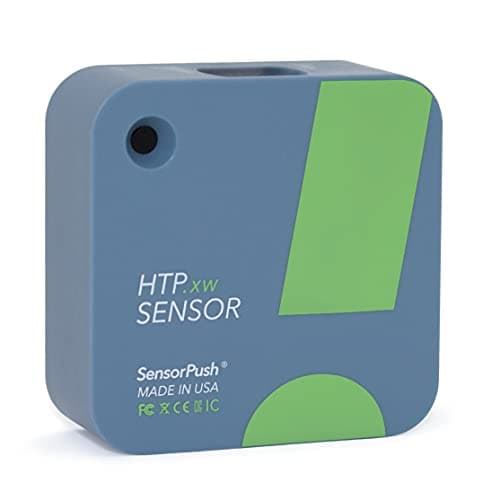 Most accurate SensorPush HTP.xw Temperature, Humidity & Barometric Pressure Sensor ±1.5% typical and ±3% maximum from 0 to 80% RH, logging a reading a minute for close to a month, plus barometric pressure. The tightest published figure here by a clear margin. | A reading you intend to act on expensively — sizing a dehumidifier, diagnosing a damp wall, or settling an argument about whether a room is actually out of band | |
| 3 | 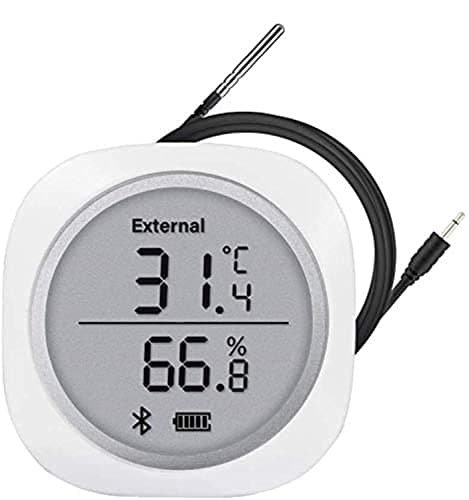 Best for logging and a probe Inkbird IBS-TH1 Plus Bluetooth Temperature and Humidity Monitor 30,000 logged points, a selectable 10-second to 30-minute interval and an external probe in the box, built on a named HTU21D sensor, with a screen as well as an app. | Measuring somewhere you cannot put the whole device — inside a wall void, under a floor, in a crawl space — or capturing weeks of data cheaply | |
| — | 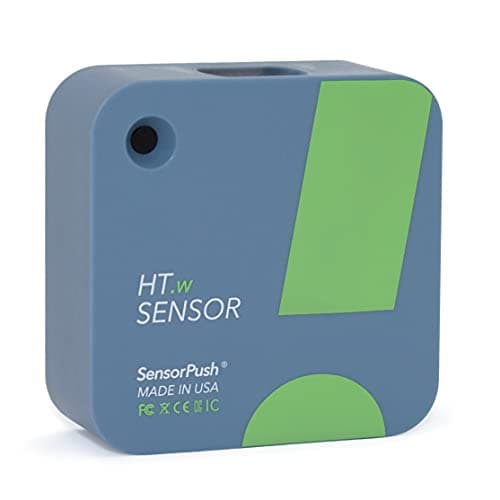 The one to skip SensorPush HT.w Temperature & Humidity Sensor ±2% typical but ±4.5% maximum from 10 to 90% RH, widening to ±4% typical and ±7.5% maximum across the full range. The loosest published figure on this page. | Very little, once you have compared the spec sheets — it is the cheaper SensorPush, and the accuracy is most of what you were buying SensorPush for |
Nearly every recommendation on this site resolves to the same instruction. Work out whether to run a dehumidifier — take a reading. Decide whether your house wants moisture added or removed — take a reading. Diagnose a window that streams every morning — take a reading, in that room, at the hour the problem is worst.
Thirteen pages on this site tell you to do that and none of them, until now, told you what to do it with. This is that page.
Criteria
How these are judged, in order
- Published humidity accuracy, in ± % RH. The whole decision. A meter is an instrument, and an instrument with no stated tolerance is a decoration. Where a maker publishes both a typical and a maximum figure we use the maximum, because that is the one that decides whether a reading can be trusted.
- The conditions attached to that figure. An accuracy number means nothing without the humidity range and temperature it applies at. "±2% from 10 to 90% RH" and a bare "±2%" are not the same claim, and we rank the first above the second even though they print the same number.
- Whether it can be corrected. Humidity sensors drift. A manual calibration option is the difference between a meter that ages gracefully and one you eventually throw away.
- Whether it records. A humidity problem is a pattern over nights and weeks, not a number at a moment. High/low memory is the minimum; real logging is better.
- Where it can physically go. A probe or a remote sensor reaches the crawl space, the wall void and the cold cupboard that a wall gauge cannot.
- What is missing. Battery life, sensor part numbers and IP ratings go unpublished across most of this category. We show those gaps rather than filling them.
We have tested none of these and own no reference hygrometer to test them against. Every figure here is the manufacturer’s own, quoted with the conditions they attach to it, and the arithmetic in the next section is marked as ours. How we pick.
The arithmetic
What your display must read to be sure
The EPA publishes the target this whole site works to: keep indoor relative humidity “below 60 percent (ideally between 30 and 50 percent)”. That is a 10-point ideal band with a hard ceiling 10 points above it, and it is the reason accuracy is not an audiophile concern here.
If your meter can be out by a percentage points in either direction, then to know the true figure is under a limit, the display has to read the limit minus a. That is the whole calculation, and it turns an abstract tolerance into a number you can act on.
| Published accuracy | Which meter | Read below this to be sure of under 60% | …and of under 50% |
|---|---|---|---|
| ±1.5% | SensorPush HTP.xw, typical, 0-80% | 58.5% | 48.5% |
| ±2% | AcuRite 01080M, 10-90% RH | 58% | 48% |
| ±3% | SensorPush HTP.xw, maximum | 57% | 47% |
| ±4% | AcuRite 01080M, above 90% RH | 56% | 46% |
| ±4.5% | SensorPush HT.w, maximum, 10-90% | 55.5% | 45.5% |
| ±7.5% | SensorPush HT.w, maximum, 0-100% | 52.5% | 42.5% |
Our arithmetic: limit minus the published tolerance. Accuracy figures and their conditions are the manufacturers’ own. The EPA band is from its mold and moisture guidance.
Read the bottom row again. With a meter whose published maximum error is ±7.5%, a display showing 55% is consistent with a true humidity anywhere from 47.5% to 62.5% — comfortably inside the ideal band, or over the EPA ceiling entirely. It cannot answer the question.
And read the top rows for the opposite reason: the gap between ±1.5% and ±2% moves the threshold by half a point. Beyond a certain tightness this stops mattering, which is why the cheapest meter here is the top pick rather than the dearest.
The finding
Three meters say “±2%” and mean three different things
Every pick on this page publishes a ±2% humidity figure somewhere. They are not the same claim, and the differences are entirely in the conditions each maker attaches:
- SensorPush HTP.xw: ±2% typical with a separate ±3% maximum, stated across 0 to 100% RH, at 77 F — plus a tighter ±1.5%/±3% pair for the 0 to 80% range. Four numbers, two ranges, a temperature.
- AcuRite 01080M: ±2% from 10 to 90%, and ±4% outside it. One number, one range, and an explicit statement of where it degrades.
- Inkbird IBS-TH1 Plus: ±2%RH. No range, no temperature, no typical-versus-maximum distinction.
On the headline number those look identical. In information content they are not close, and the ranking on this page follows the disclosure rather than the digit. A maker who publishes a worse number with its conditions is telling you more than one who publishes a better number without them.
This is the same pattern this site keeps finding in cooling equipment, where Vornado publishes a throw distance and no wattage, and most portable fans publish no airflow at all. Which brands publish, measured across the fan category.
The other finding
Your dehumidifier’s own display is not a measurement
Nearly every modern dehumidifier shows a humidity percentage and lets you set a target against it. It is natural to treat that as the reading, and to conclude you do not need a separate meter at all.
The federal certification data says otherwise by omission. The ENERGY STAR Certified Dehumidifiers dataset records, for all 559 certified models: capacity on DOE Appendix X1, integrated energy factor, annual kWh, refrigerant type and global warming potential, refrigerant charge, and whether the unit is connected. It contains no humidity-accuracy field, and no acoustic field either.
So the percentage on the panel has no published tolerance behind it, and no maker we have looked at states one. It is good enough to cycle the compressor against; it is not good enough to tell you whether the room is inside a 10-point band. There is also a placement problem: the humidistat sits inside the machine, reading air it has just dried, which is not the air in the far corner of the room.
This one is not a DIY job
Put the meter where the problem is, not where the machine is. A reading from the heated hallway tells you nothing about an unheated spare room — the two routinely differ by twenty points in the same house, because relative humidity depends on the temperature of the air you are measuring. Take the reading in the room that has the symptom, at the hour the symptom is worst, and leave the meter there long enough to catch the overnight peak. Then place the machine separately.
Using it
What to do with the number once you have it
- Above 60%: outside the EPA band, with a mold risk attached. Dehumidify, and look for a source — a dehumidifier run against active water ingress is a permanent bill with no end state. Dehumidifiers on certified efficiency.
- 50 to 60%: inside the published maximum, above the ideal. Worth a dehumidifier on a humidistat rather than a continuous run. What to set the dial to.
- 30 to 50%: the target band. If something is still wet — a window, a cold corner — the problem is a surface temperature rather than the air, and no machine on this site fixes it. Why glass goes wet in a dry house.
- Below 30%: below the band. That is humidifier territory, which this site does not stock and will not pretend to review. Which machine you actually need.
One reading is also not a diagnosis. Humidity swings overnight as surfaces cool, and the figure that matters for mold and for condensation is the peak rather than the average — which is the practical case for high/low memory on a cheap meter, or logging on a dearer one.
Placement
Where to put it, and where not to
- Away from the dehumidifier’s outlet. Standing a meter in the dried airstream reads the machine, not the room.
- Off external walls and away from windows. Those surfaces are the cold spots, and air against them is not representative of the room — though if the cold spot is what you are diagnosing, that is exactly where the probe should go.
- At roughly the height that matters. Moisture stratifies. A reading at floor level in a basement and one at head height can differ meaningfully.
- Not in direct sun and not above a radiator. Both raise local temperature, which drops relative humidity and flatters the room.
- Give it time. These sensors take minutes to equilibrate after being moved, and far longer after coming in from a cold car.
Say the unwelcome thing
Do not buy an analog dial hygrometer for this job.
The brass-rimmed dial gauges sold as decor almost never publish an accuracy figure at all, and the hair or coil mechanisms behind them drift substantially over time with no straightforward way to check them. They look better on a wall than any pick on this page. They are not instruments.
The other thing not to do is rely on how a room feels. Warm damp air and cool dry air are routinely misread for each other, which is the whole reason a two-figure purchase sits in front of a two- or three-figure one here — and why we would rather you bought a meter than the wrong machine.
In full
Every pick, and what is wrong with it
Published specifications only, each linked to the page it came from. Where a manufacturer publishes nothing, the row says so — we do not fill blanks in.
1. Best overall
AcuRite 01080M Pro Accuracy Temperature and Humidity Gauge
AcuRite · model 01080M
±2% RH from 10 to 90%, ±0.5 F, a manual calibration option and 24-hour plus all-time high/low records. The only pick that is both cheap and candid about where its accuracy applies.
±2% from 10 to 90% RH, and ±4% below 10% and above 90%. That second clause is the reason this is the top pick rather than merely the cheap one. AcuRite publishes where its accuracy figure stops applying, which is a more useful disclosure than a better number with no conditions attached.
±0.5 F on temperature, a 1 to 99% RH measuring range, and the display updates every 10 seconds. It records 24-hour and all-time highs and lows, which matters more than it sounds: humidity in a problem room swings overnight, and a spot reading at 7 p.m. tells you about 7 p.m.
The feature worth paying for is the manual calibration option. Humidity sensors drift, and most consumer meters give you no way to correct one that has. This is the only pick on this page with a published calibration adjustment.
The honest limit is the top of the range. A damp basement, a crawl space or a bathroom after a shower sits above 90% RH, and that is precisely where this meter widens to ±4%. If the room you are diagnosing is genuinely wet rather than merely humid, read the next pick. Basements, where most of these readings get taken.
What’s wrong with it
±4% below 10% and above 90% RH — and above 90% is exactly where a wet basement or crawl space sits, so the reading degrades in the room you most want to measure. One-year warranty, no logging and no export, and AcuRite lists it as backordered on its own store even while it ships elsewhere.
Running cost
AcuRite does not publish a wattage for the 01080M, so we cannot calculate what it costs to run. We are not going to estimate one. If AcuRite publishes a nameplate figure, this block will show the arithmetic.
| Humidity accuracy | ±2% from 10 - 90% RH; ±4% below 10% and above 90% |
|---|---|
| Temperature accuracy | ±0.5 F (no Celsius figure published) |
| Humidity range | 1% to 99% RH |
| Temperature range | -4 F to 158 F |
| Calibration | Manual calibration option |
| Display | LCD with 24-hour and all-time high/low records |
| Update rate | Every 10 seconds |
| Logging | None — high/low records only, no export |
| Power | 2 x AAA alkaline, not included |
| Warranty | 1 year limited |
Every figure above is from AcuRite product page, 01080M Pro Accuracy monitor. Blanks are shown as “not published” rather than filled in.
2. Most accurate
SensorPush HTP.xw Temperature, Humidity & Barometric Pressure Sensor
SensorPush · model HTP.xw
±1.5% typical and ±3% maximum from 0 to 80% RH, logging a reading a minute for close to a month, plus barometric pressure. The tightest published figure here by a clear margin.
±1.5% typical, ±3% maximum, from 0 to 80% RH at 77 F. Across the full 0 to 100% range it publishes ±2% typical and ±3% maximum. Note that the maximum holds at ±3% across both ranges — the figure that degrades is the typical one, which is a more reassuring shape than the reverse.
Temperature is ±0.18 F typical and ±0.54 F maximum, which is an order of magnitude tighter than anything else on this page and frankly more than a cooling decision needs.
One reading a minute, stored close to a month on the sensor itself. This is the practical argument for it over a wall gauge: a month of minute-by-minute data shows you the overnight peak, how long the room sits above the line, and whether a dehumidifier is actually holding its set point. Which is the question run-time advice turns on.
Two honest caveats, both published by SensorPush. Prolonged exposure above 80% RH may create an offset of up to +3%, reversing gradually once conditions drop back — so even the best meter here has a known weakness in a wet room. And it is splash and rain proof with no IP rating published, so "water resistant" is the maker's word rather than a tested class.
What’s wrong with it
No display whatsoever — it is a sensor you read on a phone, so there is nothing to glance at on a shelf, and out of Bluetooth range it tells you nothing live. It is also roughly four times the price of the AcuRite, and SensorPush publishes no sensor part number, so the figures cannot be traced to a component datasheet.
Running cost
SensorPush does not publish a wattage for the HTP.xw, so we cannot calculate what it costs to run. We are not going to estimate one. If SensorPush publishes a nameplate figure, this block will show the arithmetic.
| Humidity accuracy, 0-80% RH | ±1.5% typical, ±3% maximum (at 77 F) |
|---|---|
| Humidity accuracy, 0-100% RH | ±2% typical, ±3% maximum (at 77 F) |
| Temperature accuracy | ±0.18 F typical, ±0.54 F maximum (68 - 140 F) |
| Humidity range | 0 - 100% RH |
| Temperature range | -40 F to 140 F |
| Barometric pressure | 300 - 1,250 mb, ±0.5 mb typical |
| Display | None — a Bluetooth sensor, read on a phone |
| Wireless range | 100 m / 325 ft line of sight |
| Battery | CR2477, typically over 2 years |
| Logging | One reading a minute, stored on the sensor close to a month |
| Water resistance | Splash and rain proof; no IP rating published |
| Sensor part number | Not published |
Every figure above is from SensorPush product page, HTP.xw. Blanks are shown as “not published” rather than filled in.
3. Best for logging and a probe
Inkbird IBS-TH1 Plus Bluetooth Temperature and Humidity Monitor
Inkbird · model IBS-TH1 Plus
30,000 logged points, a selectable 10-second to 30-minute interval and an external probe in the box, built on a named HTU21D sensor, with a screen as well as an app.
30,000 data points, or about 20 days at a one-minute interval, with the sampling rate selectable from 10 seconds to 30 minutes. At the slower intervals that is months of unattended recording for well under half the price of the SensorPush.
The external probe is the real differentiator and the reason it earns a place. A wall gauge measures the air where the gauge is; a probe on a lead measures the air where the problem is. For a crawl space, a wall void or the back of a cold cupboard that is the difference between a reading and a guess.
It is also the only pick here that names its sensor component — an HTU21D. That is unusual candor in the category: it means the underlying part has a published datasheet of its own, independent of Inkbird’s marketing.
Now the problem, and it is the reason this is third rather than first. Inkbird publishes "±2%RH" with no range and no temperature condition. AcuRite tells you its ±2% holds from 10 to 90%; SensorPush tells you its figure is typical, gives a separate maximum, and names the temperature. An unconditioned number is not the same claim, and we will not treat it as one.
What’s wrong with it
It publishes ±2% RH with no range and no temperature condition attached, which is a materially weaker claim than the same number from AcuRite or SensorPush. Inkbird's own category FAQ also quotes a different temperature accuracy (±0.36 F) from its product page (0.5 F), battery life is not published, and the battery is not in the box.
Running cost
Inkbird does not publish a wattage for the IBS-TH1 Plus, so we cannot calculate what it costs to run. We are not going to estimate one. If Inkbird publishes a nameplate figure, this block will show the arithmetic.
| Humidity accuracy | ±2% RH — published with no range and no temperature condition |
|---|---|
| Temperature accuracy | 0.5 F — published with no range and no temperature condition |
| Sensor part number | HTU21D |
| Humidity range | 0 - 99% RH |
| Temperature range | -40 to 140 F internal; -40 to 212 F on the external probe |
| Logging | 30,000 points — 20 days at a one-minute interval |
| Sampling interval | 10 s to 30 min, selectable |
| Display | LCD, plus a phone app over Bluetooth |
| Wireless range | 50 m / 150 ft with no obstructions |
| External probe | Included |
| Battery | Not published, and not included |
Every figure above is from Inkbird product page, IBS-TH1 Plus. Blanks are shown as “not published” rather than filled in.
Skip this one
SensorPush HT.w Temperature & Humidity Sensor
SensorPush · model HT.w
±2% typical but ±4.5% maximum from 10 to 90% RH, widening to ±4% typical and ±7.5% maximum across the full range. The loosest published figure on this page.
It is not a bad sensor, and everything structural about it is the same as the top SensorPush: a reading a minute stored over a month, 100 m / 325 ft of Bluetooth range, a CR2477 cell lasting typically over two years, the same splash-proof body.
The accuracy is the problem, and it is published plainly: ±2% typical and ±4.5% maximum from 10 to 90% RH, and ±4% typical, ±7.5% maximum across 0 to 100%. Put that beside the HTP.xw’s ±3% maximum on both ranges.
Work the ±7.5% through the table below and the problem is obvious. To be certain you are under 60% RH with a meter that can be out by 7.5 points, the display has to read 52.5% or lower — which is below the EPA band’s ideal ceiling. The instrument cannot resolve the decision it was bought to make.
So the choice is genuinely binary. If the budget is tight, the AcuRite publishes a tighter in-band figure for a fraction of the money and gives you a screen. If accuracy is the point, pay for the HTP.xw. This sits between them and wins on neither.
What’s wrong with it
A ±7.5% maximum across the full range makes a single reading nearly useless against a 10-point target band, and it still has no display. Paying less for a SensorPush means giving up the specific thing that justifies buying a SensorPush.
Running cost
SensorPush does not publish a wattage for the HT.w, so we cannot calculate what it costs to run. We are not going to estimate one. If SensorPush publishes a nameplate figure, this block will show the arithmetic.
| Humidity accuracy, 10-90% RH | ±2% typical, ±4.5% maximum (at 77 F) |
|---|---|
| Humidity accuracy, 0-100% RH | ±4% typical, ±7.5% maximum (at 77 F) |
| Temperature accuracy | ±0.36 F typical, ±0.72 F maximum (68 - 140 F) |
| Humidity range | 0 - 100% RH |
| Temperature range | -40 F to 140 F |
| Display | None — a Bluetooth sensor, read on a phone |
| Wireless range | 100 m / 325 ft line of sight |
| Battery | CR2477, typically over 2 years |
| Logging | One reading a minute, stored on the sensor over a month |
| Water resistance | Splash and rain proof; no IP rating published |
Every figure above is from SensorPush product page, HT.w. Blanks are shown as “not published” rather than filled in.
We are not linking a buy button for this one. If you want to look at it anyway, it is easy enough to find — but we would rather send you to something that fits your room.
Questions people actually ask
Frequently asked
What is the best hygrometer?
The AcuRite 01080M for most people: ±2% RH from 10 to 90%, ±0.5 F, a manual calibration option and 24-hour plus all-time high/low records, at the lowest price here. If you want the tightest published figure, the SensorPush HTP.xw states ±1.5% typical and ±3% maximum — but it has no display and is read on a phone.
How accurate does a hygrometer need to be?
Tight enough to resolve the band you are working to. The EPA target is below 60 percent relative humidity and ideally 30 to 50, so with a ±2% meter you need the display to read below 58% to be sure you are under the ceiling, and below 48% to be sure you are inside the ideal band. At ±7.5% a reading of 55% is consistent with anything from 47.5% to 62.5%, which answers nothing.
Can I just use the humidity reading on my dehumidifier?
For cycling the machine, yes. For deciding anything, no — and the certification data shows why. The ENERGY STAR Certified Dehumidifiers dataset records capacity, efficiency, annual kWh, refrigerant and connectivity for all 559 certified models and contains no humidity-accuracy field at all, so the panel figure has no published tolerance. The sensor also sits inside the machine, reading air it has just dried. What to set a dehumidifier to.
Where should I put a hygrometer?
In the room with the symptom, at the hour the symptom is worst, away from the dehumidifier's outlet, out of direct sun and not above a radiator. Keep it off external walls unless the cold wall is what you are diagnosing — and leave it in place long enough to catch the overnight peak, because humidity swings as surfaces cool.
Do hygrometers need calibrating?
They drift, and most consumer models give you no way to correct it. Of the four here only the AcuRite 01080M publishes a manual calibration option. SensorPush also publishes a known weakness worth knowing about: prolonged exposure above 80% RH may create an offset of up to +3%, which reverses gradually once conditions drop back below 80%.
What humidity should my house be?
The EPA publishes below 60 percent relative humidity, ideally between 30 and 50 percent. That band is written against mold and moisture damage. In winter the practical constraint is tighter than the number alone implies, because the colder your windows and external walls are, the lower the humidity has to be to keep them dry. Condensation and what stops it.
Is a Bluetooth sensor better than a wall gauge?
Only if you will use what it adds. A SensorPush logs a reading a minute for close to a month, which shows the overnight peak and whether a dehumidifier is holding its set point — genuinely useful for a diagnosis. It has no screen at all, so for a number you glance at on a shelf a wall gauge is the better object and here also the cheaper and, in band, the equally accurate one.
Sources
Where these numbers came from
- SensorPush product page, HTP.xw — ±1.5% typical / ±3% maximum humidity accuracy (0-80% RH at 77 F), ±0.18 F typical temperature, CR2477, one reading a minute
- SensorPush product page, HT.w — ±2% typical / ±4.5% maximum (10-90% RH), ±4% / ±7.5% across 0-100% RH, and the +3% offset note above 80% RH
- AcuRite product page, 01080M Pro Accuracy monitor — ±2% from 10-90% RH, ±4% outside it, ±0.5 F, manual calibration option, 10-second update, 1-year warranty
- Inkbird product page, IBS-TH1 Plus — ±2%RH and 0.5 F published without range or temperature conditions, HTU21D sensor, 30,000 logged points, external probe
- EPA, A Brief Guide to Mold, Moisture and Your Home — keep indoor humidity below 60 percent, ideally between 30 and 50 percent
- ENERGY STAR Certified Dehumidifiers dataset — the 559 certified records, which carry no humidity-accuracy field
Read next
Where to go from here
Back to Dehumidifiers, or read how we pick.