The picks
The best desk fans, and why proximity beats power
The whole argument for a desk fan is distance. Two feet away on the lowest speed does more for you than a hundred-watt fan across the room, and it costs almost nothing.
By Sawyer V. · Published
The short answer
The Lasko Whirlwind Tilt A12107: 18–32 W, 39 dBA on low published, 2.78 lb, and it wall-mounts to free the desk entirely. About 79¢ for a month of eight-hour days on low. Anything larger is being asked to do a job that proximity already solved.
Fan & Frost earns a commission when you buy through our links, at no cost to you. It never changes a ranking, and we say so when the right answer is the cheaper unit or nothing at all. Full disclosure · How we pick.

At a glance
The picks, ranked
Tap any row to jump to the full reasoning. Prices are live from Amazon where we have them, and read “check price” where we don’t — never a number we cannot verify today.
| # | Product | Best for | Price |
|---|---|---|---|
| 1 | 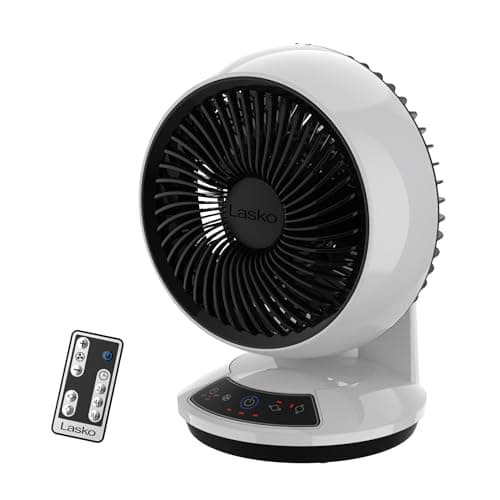 Best overall Lasko Whirlwind Tilt 12" Table Fan 39 dBA and 18 W on low, published, plus a wall-mount option that gets it off the desk entirely. | A desk, a nightstand, or anywhere you sit for hours | |
| 2 | 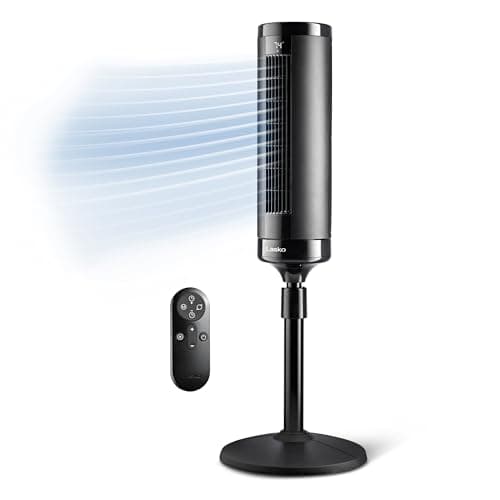 If the desk is in a bedroom Lasko EcoQuiet 42" DC Tower Fan 23 dBA on low against the desk fan's 39, and twelve speeds — for a room that has to be quiet at both ends of the day. | A room that is both an office and somewhere you sleep | |
| 3 | 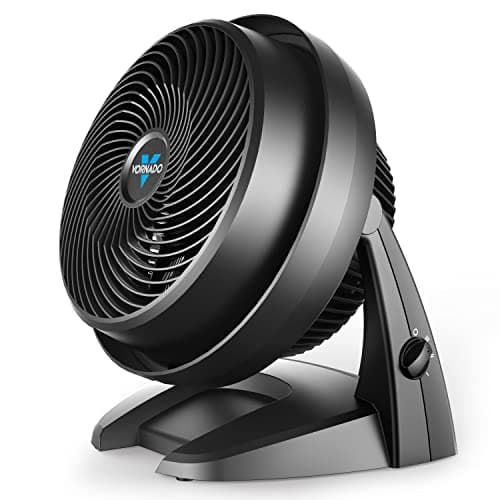 If the whole room needs air Vornado 630 Medium Air Circulator A published 70 ft reach circulates a room rather than aiming at one person — the opposite approach to a desk fan. | A home office where several people or the whole space needs moving air | |
| — | The one to skip at a desk Lasko Power Plus 20" Box Fan 102 W and an unpublished noise figure, to do a job an 18 W fan two feet away does better. | A window or a garage, not a workspace |
A desk fan is the least glamorous purchase in home cooling and, per dollar and per watt, one of the most effective. The reason is entirely about distance.
The principle
Why a small fan close beats a big fan far
A fan does not cool a room. It moves air across skin, which speeds evaporation and strips off the warm layer sitting against you. All of that effect happens at your body. Air moving briskly on the other side of the room is doing nothing for you at all.
Airflow also spreads and slows as it travels. A fan across the room has to move a great deal more air to deliver the same velocity at your skin as a small fan two feet away delivers on its lowest setting.
| Approach | Watts | 30 × 8-hr days | Published noise |
|---|---|---|---|
| Desk fan at 2 ft, low | 18 W | 79¢ | 39 dBA |
| Desk fan at 2 ft, high | 32 W | $1.41 | 55 dBA |
| Tower fan across the room, high | 19 W | 84¢ | 46 dBA |
| Box fan across the room, high | 102 W | $4.49 | Not published |
Wattages and decibels from Lasko’s product pages; costs are our arithmetic at 18.34¢/kWh.
Run a desk fan on its lowest speed and it costs less to run and makes less noise than a bigger fan working hard across the room. That is the whole argument, and it is why the correct desk fan is usually the smallest one that reaches you.
Buying
What to look for
- A published wattage and decibel figure. Rare, and worth prioritizing on principle — a manufacturer that publishes both is easier to trust on everything else.
- Enough speeds to find “just enough”. At two feet, the difference between speeds is much more pronounced than across a room. Three speeds is workable; more is better.
- Tilt. More useful than oscillation at a desk. You want to aim it once, at your face or your forearms, and leave it.
- A wall-mount option, if desk space is tight. The fan stops competing with your monitor.
- Weight and footprint. Under 3 lb and under a foot tall keeps it from taking over.
Say the unwelcome thing
Do not buy a USB-powered mini fan expecting it to do anything.
A USB port supplies at most a few watts, and typically the small desk-toy fans draw 2 to 3 W. That is an order of magnitude below the 18 W of a real desk fan, and it shows: they move a thin stream of air a few inches.
They are fine as a novelty on a still day. They are not a cooling product, and they are frequently sold at prices approaching a real desk fan that draws six times the power and actually reaches you.
Placement
Where to point it
- At your forearms and face, not your back. Exposed skin is where evaporation happens. Air on a shirt does little.
- Slightly to one side rather than straight on. A direct stream in the eyes dries them out over a working day, which is the most common reason a desk fan gets switched off.
- Then turn it down. Once it is aimed properly, the lowest speed is usually enough — and that is where the 18 W and 39 dBA figures apply rather than 32 W and 55 dBA.
- Not blowing across paperwork. Obvious, easily forgotten, mildly infuriating.
And if the room itself is genuinely hot rather than you being warm, a desk fan is treating a symptom. Above roughly 95°F moving air stops helping at all, and the room-level fixes are here — blinds closed during the day is free and does more than any fan.
In full
Every pick, and what is wrong with it
Published specifications only, each linked to the page it came from. Where a manufacturer publishes nothing, the row says so — we do not fill blanks in.
1. Best overall
Lasko Whirlwind Tilt 12" Table Fan
Lasko · model A12107
39 dBA and 18 W on low, published, plus a wall-mount option that gets it off the desk entirely.
18 to 32 W, 39 to 55 dBA, both published. That matters because most small fans publish neither, and “whisper quiet” on a listing is unfalsifiable.
At 18 W on low, a month of eight-hour working days costs about 79¢ at 18.34¢/kWh. Effectively nothing.
2.78 lb and 11 inches tall is the specification that makes it work at a desk. It goes where you need it, gets moved without thinking about it, and does not dominate the surface. The 50-foot air distance figure is far more than you need at 2 feet — which is the point: you can run it slowly.
The wall-mount option is the underrated feature. On a small desk, the fan is competing with your monitor and your notes for space. Mounted on the wall beside or above the desk, it aims down at you and the desk is yours again. Hardware is not included, which is a mild annoyance.
Three speeds is the limitation. On a fan this close to you, more steps would help — the gap between speeds one and two is noticeable at two feet in a way it would not be across a room.
What’s wrong with it
39 dBA on low is well above the 23 dBA of a good DC tower fan — small fans have to spin fast to move air, and speed makes noise. Lasko publishes no CFM for it either.
Running cost — A12107
| Nameplate power | 18 W – 32 W | manufacturer's published figure |
|---|---|---|
| Energy, 8-hour night | 0.26 kWh | 32 ÷ 1000 × 8 |
| Cost per hour | 0.6¢ | at 18.34¢/kWh |
| Cost per 8-hour night | 4.7¢ | on the highest speed |
| Cost per 30 nights | $1.41 | 7.7 kWh |
| Same month, lowest speed | 79¢ | at 18 W |
Rate: 18.34¢/kWh, the US average residential price for June 2026 (EIA Electric Power Monthly, Table 5.3). Yours will differ — swap it in: (watts ÷ 1000) × hours × your rate.
| Power | 18 W - 32 W (0.24-0.5 A at 120 V) |
|---|---|
| Noise | 39 dBA low, 55 dBA high |
| Air distance | 50 ft |
| Speeds | 3 |
| Dimensions | 11.19 H x 11.4 W x 6.2 D in |
| Weight | 2.78 lb |
| Mounting | Wall-mountable (hardware not included) |
| Air delivery (CFM) | Not published |
| Warranty | 1 year |
Every figure above is from Lasko product page, A12107. Blanks are shown as “not published” rather than filled in.
2. If the desk is in a bedroom
Lasko EcoQuiet 42" DC Tower Fan
Lasko · model T42710
23 dBA on low against the desk fan's 39, and twelve speeds — for a room that has to be quiet at both ends of the day.
A lot of desks are in bedrooms now, and that changes the calculation: the fan has to be acceptable while you work and while you sleep.
23 dBA on low against the desk fan’s 39 is a substantial difference — decibels are logarithmic, so 16 dB is much larger than it looks. And 2.9 W at that setting, about 13¢ for a month.
Twelve speeds is the other advantage, and it matters more at close range. A three-speed fan two feet from your face often has nothing usable between too little and too much.
The trade is that it stands on the floor and its airflow column stops around 40 inches, so it works well at a seated desk and less well at a standing one. More on quiet fans here.
What’s wrong with it
It occupies floor space rather than desk space, and its airflow column tops out around 40 inches, so at a standing desk it hits your torso rather than your face.
Running cost — T42710
| Nameplate power | 2.9 W – 19 W | manufacturer's published figure |
|---|---|---|
| Energy, 8-hour night | 0.15 kWh | 19 ÷ 1000 × 8 |
| Cost per hour | 0.3¢ | at 18.34¢/kWh |
| Cost per 8-hour night | 2.8¢ | on the highest speed |
| Cost per 30 nights | 84¢ | 4.6 kWh |
| Same month, lowest speed | 13¢ | at 2.9 W |
Rate: 18.34¢/kWh, the US average residential price for June 2026 (EIA Electric Power Monthly, Table 5.3). Yours will differ — swap it in: (watts ÷ 1000) × hours × your rate.
| Power | 2.9 W - 19 W (0.06-0.303 A at 120 V) |
|---|---|
| Noise | 23 dBA low, 46 dBA high |
| Speeds | 12 |
| Height | 41.6 in |
| Footprint | 12.8 x 12.8 in |
| Weight | 7.8 lb |
| Timer | 8 hours |
| Air delivery (CFM) | Not published |
| Warranty | 2 years |
Every figure above is from Lasko product page, T42710. Blanks are shown as “not published” rather than filled in.
3. If the whole room needs air
Vornado 630 Medium Air Circulator
Vornado · model 630
A published 70 ft reach circulates a room rather than aiming at one person — the opposite approach to a desk fan.
Occasionally the desk fan is the wrong frame entirely. If two people share the office, or the room is stuffy rather than you being hot, you want circulation rather than a directed breeze.
An air circulator produces a focused vortex that holds together over distance — Vornado publishes “up to 70 feet” — so aimed at a far wall it sets up a loop that turns over the whole room.
The 5-year warranty is genuinely good. The absence of published wattage, CFM and noise is genuinely not, and it means we cannot tell you what it costs to run. The circulator comparison is here.
What’s wrong with it
No wattage, no CFM, no noise figure published, so nothing about its efficiency or quietness can be verified. It is also far more fan than one person at a desk needs.
Running cost
Vornado does not publish a wattage for the 630, so we cannot calculate what it costs to run. We are not going to estimate one. If Vornado publishes a nameplate figure, this block will show the arithmetic.
| Power | Not published |
|---|---|
| Airflow reach | Moves air up to 70 ft |
| Speeds | 3 |
| Air delivery (CFM) | Not published |
| Dimensions | Not published |
| Weight | Not published |
| Warranty | 5 years |
Every figure above is from Vornado product page, 630. Blanks are shown as “not published” rather than filled in.
Skip this one
Lasko Power Plus 20" Box Fan
Lasko · model B20801
102 W and an unpublished noise figure, to do a job an 18 W fan two feet away does better.
Box fans end up in home offices because they are cheap and obviously powerful. In this application that power is the problem rather than the point.
73–102 W against 18 W for the desk fan — $4.49 against 79¢ for a month of working days. You are paying roughly five times as much to move air past a person who could have been reached from two feet away.
The noise is the bigger issue. Lasko publishes no decibel figure for it, and an open 20-inch blade produces broad turbulent noise with a rattly edge — different in character from a small fan’s smoother hiss and considerably harder to work through.
It is an excellent fan in a window, where it does something no desk fan can. Just not next to a keyboard.
What’s wrong with it
73-102 W with no published dBA, and a 20-inch open-frame blade produces broadband turbulent noise that is genuinely hard to concentrate through.
Running cost — B20801
| Nameplate power | 73 W – 102 W | manufacturer's published figure |
|---|---|---|
| Energy, 8-hour night | 0.82 kWh | 102 ÷ 1000 × 8 |
| Cost per hour | 1.9¢ | at 18.34¢/kWh |
| Cost per 8-hour night | 15¢ | on the highest speed |
| Cost per 30 nights | $4.49 | 24.5 kWh |
| Same month, lowest speed | $3.21 | at 73 W |
Rate: 18.34¢/kWh, the US average residential price for June 2026 (EIA Electric Power Monthly, Table 5.3). Yours will differ — swap it in: (watts ÷ 1000) × hours × your rate.
| Power | 73 W - 102 W (0.6-0.9 A at 120 V) |
|---|---|
| Speeds | 3 |
| Dimensions | 21.25 H x 22.5 x 4.75 in |
| Weight | 10.1 lb |
| Motor | Weather-resistant |
| Air delivery (CFM) | Not published |
| Warranty | 2 years |
Every figure above is from Lasko product page, B20801. Blanks are shown as “not published” rather than filled in.
We are not linking a buy button for this one. If you want to look at it anyway, it is easy enough to find — but we would rather send you to something that fits your room.
Questions people actually ask
Frequently asked
What is the best desk fan?
The Lasko Whirlwind Tilt A12107 on published specifications: 18 to 32 W, 39 dBA on low, 2.78 lb, with a wall-mount option that frees the desk. Most desk fans publish neither wattage nor noise, which makes this one checkable.
How much electricity does a desk fan use?
Around 18 to 32 W for a 12-inch fan. At 18.34¢/kWh that is about 79¢ for a month of eight-hour working days on low, or $1.41 on high. Small enough not to matter, which is rather the point.
Is a small fan close to you better than a big fan across the room?
Yes, on both power and noise. The cooling effect happens at your skin, and airflow spreads and slows as it travels, so a big fan has to move much more air to deliver the same velocity at you. An 18 W desk fan two feet away beats a 102 W box fan across the room.
Are USB mini fans any good?
Not as cooling. A USB port supplies a few watts at most, so these typically draw 2 to 3 W against 18 W for a real desk fan, and they move a thin stream of air a few inches. They are a novelty, often priced close to something that would actually work.
How loud is a desk fan?
The Lasko A12107 publishes 39 dBA on low and 55 on high. Small fans are generally louder than large ones at comparable airflow, because a small blade has to spin fast and speed is what makes noise — a DC tower fan publishes 23 dBA on low.
Should a desk fan oscillate?
Usually not. Oscillation is for covering several people or a wide area; at a desk you want the air aimed at one place consistently. A tilt adjustment is far more useful, and a steady airflow is also less distracting than a rising and falling one.
Sources
Where these numbers came from
- Lasko A12107 Whirlwind Tilt specifications — 18-32 W, 39/55 dBA, wall-mountable
- Lasko EcoQuiet T42710 specifications — 2.9-19 W, 23/46 dBA
- Lasko B20801 box fan specifications — 73-102 W, no noise figure
- Vornado 630 air circulator — 70 ft reach, no wattage published
- EIA Electric Power Monthly, Table 5.3 — electricity rate
Read next
Where to go from here
Back to Fans, or read how we pick.